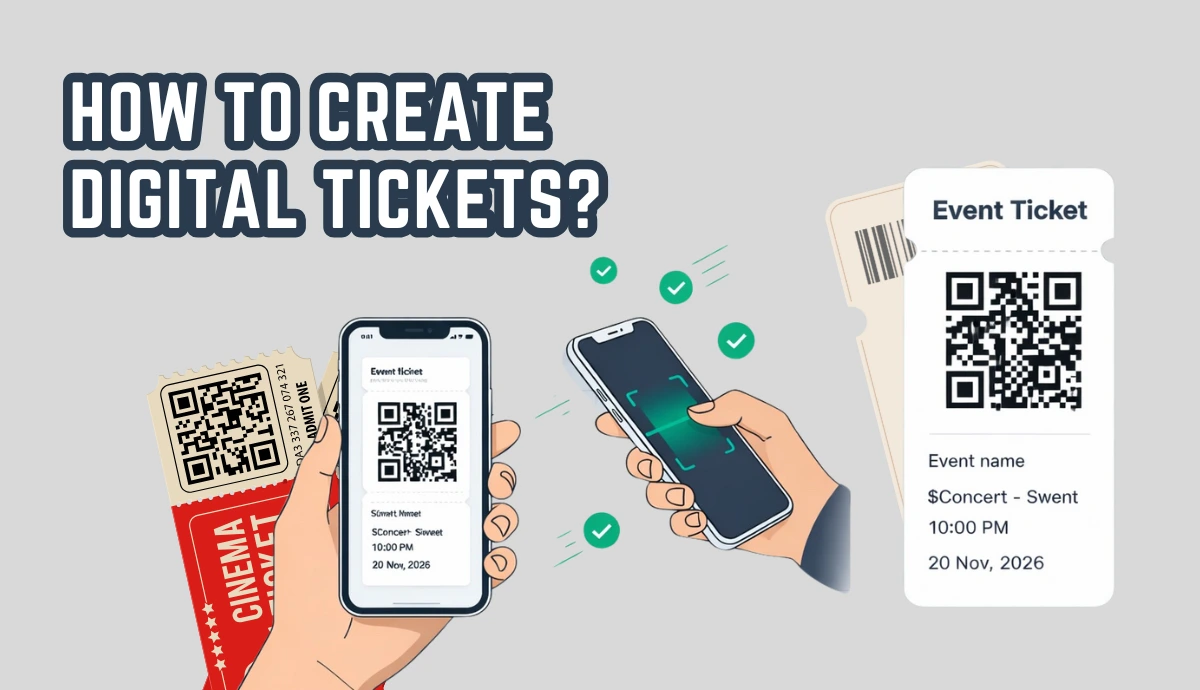
Digital tickets replace paper with QR or barcode tickets shown on guests’ phones.
They speed up entry and reduce long lines at the gate.
Each ticket can be validated once, helping stop sharing and fake entries.
You can send tickets instantly by email or link—no printing needed.
Scan data gives real-time attendance and entry insights.
You can create and start using digital tickets in minutes with a simple ticket generator.
Let's say you're planning an event. It could be a party, seminar, movie show, or formal ceremony. Now, of course you would want to ensure a safe and secure experience for your guests.
And we all know the real event struggles. Event lines get long. Printed tickets get lost. Fake entries happen.
Well, what if you could use the digital tickets to do more than just authorize event entries?
Yes! Digital tickets fix these problems. From contactless distribution and guest validation to ensuring social distancing and getting event attendance, digital tickets can do it all.
Instead of paper, each guest gets a ticket on their phone. At the gate, you scan the code. Entry takes seconds. You also see who has arrived in real time.
In this guide, you’ll learn how digital tickets work and how to create them for your own event.
A. What are digital tickets?
Digital tickets are tickets you don’t print. They live on a phone as a QR code or barcode.
People use digital tickets for concerts, workshops, school events, and fundraisers. Guests show the ticket on their screen. Staff scan it. Entry is done.
If you want faster entry and fewer fake tickets, go digital.
Digital tickets vs e-tickets vs mobile tickets (quick clarity)
These terms are often used the same way.
Digital ticket / e-ticket: a ticket sent online (usually email or link).
Mobile ticket: a digital ticket designed to be shown on a phone.
QR/barcode ticket: the format used at the gate for quick scanning.
In simple terms: if it can be scanned from a phone, it’s a digital ticket.
B. How digital tickets work?
Tools such as Ticket Generator help you create QR code-based digital tickets for your events.
You probably know what QR Codes are. For the uninitiated, QR Codes are square-shaped 2D barcodes that can store a lot of information. And they are easy to scan. All you need is your smartphone to do the job.
To understand how it works, you can check out this video:
https://www.youtube.com/watch?v=xAnl8Se4x9c&t=1s
Here’s the basic flow most events follow:
Create tickets
Send tickets (email/SMS/link)
Guests show the ticket at entry
Staff scan and validate
You see attendance and scan data in real time
This is why digital tickets feel “easy” on event day. The hard part is already done.
Set Up Event Ticketing and Distribution in Minutes!
First 10 tickets free | Free account | No credit card required
We'll now see what perks can these tickets offer you:
C. Event processes that are made better with digital tickets
1. Get contactless event registrations
It's common for any event to need the audience to register for it. And it's great if you can get registrations while generating tickets against them at the same time.
And to do it, Ticket Generator's feature called Event Registrations comes in handy.
This feature creates a mobile landing page with a registration form. Once created, you can share its link with your target audience. You can even choose whether you'd want the registrations to be approved automatically or manually.
Once registration is approved, the guest receives the ticket in her email. In short, this process is contactless, efficient, and time-saving.
2. Digital ticket distribution
Since you want to ensure your guests' safety, you'd probably avoid paper-based tickets. Hence, you're interested in digital tickets.
Here, professional service such as Ticket Generator has got you covered. It can help you send tickets via email, SMS, or both. When guests arrive, they can just show these digital tickets at the entry gate, get them validated, and enter the venue.
Hence, no need for guests to get them printed.
3. Digital ticket validation
Ticket validation is the most important process at an event. Traditionally, the guests would arrive with a copy of the ticket. This was then manually verified by the coordinators with their details in their database.
But this is a tedious process for both the guests and the staff.
Here, QR Code-based digital tickets have got you covered. These tickets come with a QR Code having a unique ID. Your event coordinators can scan the QR Codes on the tickets with their smartphones using a ticket validator or a QR Code scanner onlineto check whether the ticket is valid, invalid, or duplicate.
And the good news is there is no need for any expensive hardware installation to do the same. Impressive, right?
4. Contactless Queue management
You know how the pandemic has changed the paradigm of event management. It has put a great emphasis on avoiding long queues and crowding.
Thus, it is your responsibility to ensure no long queues for the people waiting in queues to get an entry for the event.
And QR Code-based digital tickets help you do it with their fast scanning ability. It doesn't take more than 2-3 seconds for a coordinator to validate each ticket using the smartphone.
The shorter the validation time, the smaller will be the queues. That means a safer environment and a better experience for the guests.
5. Contactless bulk generation of tickets
Since you are organizing an event, you'd need several tickets. They could range from hundreds to thousands in number. And you'd want a tool that allows you to generate contactless unique tickets in a matter of minutes.
Ticket Generator helps you do it easily. In fact, even while you create the tickets in bulk, you can still add unique information to them. For example, guest name, row number, and guest ID
And the best part is the more tickets you generate, the lower cost per ticket you incur. Isn't that amazing?
6. Preventing unauthorized entries
Trespassers are a pain for any event organizer. They are not only a risk for the guests but also your business's reputation.
But with digital tickets, this issue no longer remains a problem. These tickets are impossible to duplicate.
As discussed earlier, each QR Code has a unique ID. When scanned, the event coordinator can see this ID along with a prompt status showing if it's a valid, invalid, or duplicate ticket.
Hence, a strict no entry for the trespassers.
7. Tracking event performance
You know how important it is to track event performance. It helps you draw valuable insights about event performance. These include information such as the event attendance, peak time, and the number of tickets validated per coordinator.
With this data, you can optimize your future events more efficiently.
C. Which events benefit most from digital tickets?
Digital tickets work best when you need fast entry, simple check-in, and controlled access. Any event with a line, a guest list, or multiple entry points can benefit from going digital.
Here are some common event types where digital tickets make the biggest difference:
1. Concerts and festivals
Large crowds arrive in waves. Digital tickets speed up the gates because staff can scan codes in seconds. This reduces long lines and helps prevent fake or duplicated tickets.
2. Workshops and conferences
These events often have sessions, badges, or different ticket types. Digital tickets make check-in smooth and give organizers a clear view of who has arrived and which sessions are full.
3. School and college events
From cultural fests to sports days, schools need simple systems that staff and volunteers can use. Digital tickets remove the need for printed stacks and make entry quick and easy.
4. Fundraisers and charity events
Tracking attendance matters here. Digital tickets help you see how many guests showed up, which supports better reporting and planning for future events.
5. Corporate events
Corporate gatherings usually have restricted guest lists. Digital tickets help control entry, verify attendees, and keep the process professional and secure.
In short: if your event has queues, guest lists, or security needs, digital tickets make entry faster and easier to manage.
Set Up Event Ticketing and Distribution in Minutes!
First 10 tickets free | Free account | No credit card required
Here, you won't have to enter card details while signing up. And after signing up, you'll receive ten credits for free. Each credit allows you to create one ticket.
b. Now, click on Create New Event option.
c. Add event-related information such as event name, date, description, venue, and time. Once you're done, click on Create.
After you do this, your event will be created.
d. Once your event is created, click on the newly created event from the Manage Events tab. Look for the Guest Tickets selction and click on it.
e. Then, click on the New Ticket(s) drop-down button and select the Bulk Tickets option. Use this option to bulk generate and distribute tickets in batches. You will have two different options for generating and distributing your tickets.
I. Design the tickets
Now, comes the part where you need to design the tickets. Here, you can either go with the Upload Own Design option or select a pre-designed template from a number of templates.Ticket Generator offers option to design the tickets from scratch as well.
Upload Own Design: This option allows you to design your ticket using your own ready-made design template.
With this option, you can superimpose the QR Code and unique ID on the ticket.or
Moreover, it also allows you to add variable information (which would be different for each ticket) by clicking on the + button. It could be the guest's name, row number, seat number, etc.
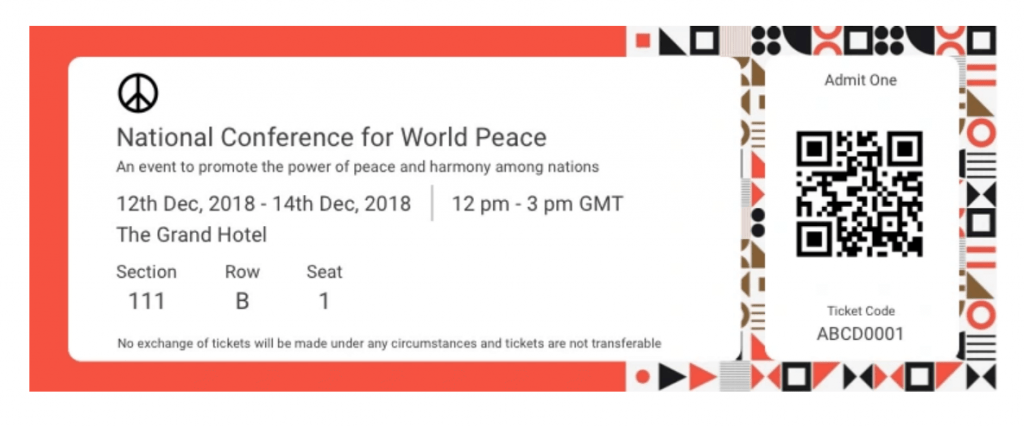
Here's an example of a ticket created using a readymade template:
Edit Design: Here, you can use the Ticket Generator's standard design to create tickets from the scratch. It gives you the option to add a logo, change the background color, or add a background image to your ticket.
Once you've designed your tickets, click on Preview to see how your ticket design looks.
Choose from templates: If you don't want to design the entire ticket but you still want to give it a fancy look, this option is right for you. Simply click on Choose from templates option to access this feature.
Once clicked, you will see a number of pre designed templates to choose from. To select a template click on Select Template button right below the chosen template and that's it, your ticket, with all the information, will turn into a designer ticket.
II. Choose the delivery method
d. After finalizing the design, click on Done. Now, specify the Delivery method. This means you need to choose how to distribute your tickets to the guests. You'll see the following four options to choose from:
i. Generate Form Link: This option allows you to design and share a mobile landing page to get event registrations. This includes adding images, event description, form fields, and customizing the button text
ii. Generate and Download: Here, you can generate and download the tickets in a printable format (PDF)
iii. Generate and Send: In this option, you will further see three options to choose from:
a. Send tickets by email only: This option allows you to email the tickets (up to 1,000) to the guests. To do it, you just need to upload a file containing the emails in CSV, XLS, or XLSX format. Or you can even manually type the emails in the given fields
b. Send tickets by SMS only: Here, you can send tickets to your guests via SMS (up to 1,000 phone numbers)
c. Send tickets by both email and SMS: In this option, you can send tickets both by SMS and email to your guests
iv. Generate via API: Ticket Generator API can be integrated with your own registration system. Once done, you can generate digital tickets programmatically in real-time
e. Once you specify all the details, click on Generate. All the digital tickets will be generated and you'll be notified via email
2. Generate single tickets for contingencies
Now you know how to generate digital tickets in bulk. But what if you need a couple of single tickets too? Here also, Ticket Generator can help you. It allows you to generate and distribute single tickets to the guests. It is useful in two scenarios:
I. Having unplanned guests at the last moment?
Say you are organizing an event and have created the tickets for it. But some unplanned guests have come to your event at the last moment. This is pretty common in events. And when that happens, you'd want to generate tickets for the new arrivals.
Now rather than generating a whole batch of tickets, you can simply create additional tickets in a couple of minutes. Here's how:
ii. From the dashboard, click on the event for which you want to create these tickets.
iii. Now, click on Guest Tickets tab.
iv. Here, click on New Ticket(s) drop-down and select the Single Ticket option select the delivery method Download Ticketand Send Ticket as per your choice
Download Ticket: This option allows you to generate and download the ticket.
Send Ticket: This option helps you send the ticket to the guest via email ID or phone number.
vi. Once selected, click Generate & Download (in case of Download Ticket) or click Generate & Send(in case of Send Ticket)
That's it. A new single ticket will be generated.
II. Resending the tickets?
Say you had sent the tickets to your guests digitally. But some of them didn't receive the them. Here's how you can resend the tickets here:
ii. From the dashboard, click on the event for which you want to resend the tickets.
iii. Now, click on Guest Tickets tab.
iv. Click on Resend Ticket.
v. Now, you'll have to specify your preferred mode of searching for the guest's ticket. You can use the ticket ID to do it. Alternatively, you can also use the guest's email address or phone number which you entered while creating the tickets
vi. Once you've entered these details, click Search. Now, you will see the ticket details
vii. Click on View and you'll be asked to specify the guest's email ID or phone number. After submitting these details, click Resend
Note that you'll not be charged extra for resending the tickets.
Now, let's move ahead to detail how you can validate these tickets.
Set Up Event Ticketing and Distribution in Minutes!
First 10 tickets free | Free account | No credit card required
Ticket validation is important to know whether the ticket is valid, duplicate, or invalid.
To do it, you can add your team members as coordinators to Ticket Genrator. Once you do it, they'll get authorized to validate the tickets. That means an increase in the manpower.
Here's how to do it:
1. Go to the Manage Event section from the dashboard
2. Select the required event for which you want to validate and click on three horizontal dots under the More heading
3. Once done, tap on Add/Edit Coordinator
Here, you need to specify the email address of each coordinator. After doing it, the coordinators will receive an email invitation. Using it, they can install and login to the Ticket Validator app on their phones
4. Next, they just need to select the event they need to validate tickets for
5. Once done, they need to click on Scan QR Code and get started with validating the tickets
That's all you need to know about digital tickets. With Ticket Generator, you can ensure a contactless and hassle-free experience for both yourself and the guests alike.
Conclusion: A simpler, faster, and safer way to run events
Digital tickets remove many of the small problems that slow events down. There’s no printing, no manual lists, and fewer chances for fake or shared tickets to slip through. Guests get a quick, smooth entry, and you get clear data on who actually showed up.
For most events, the switch to digital tickets is not a big technical change. It’s just a smarter way to handle entry. Once you try it, the speed and control are hard to give up.
Want to try digital tickets without overthinking it?
If you want to test this fast, do a small run:
Create one event
Generate 10 tickets
Send them to your team
Scan at the door with a phone
That’s enough to know if digital tickets fit your event.
Try Ticket Generator (first 10 tickets are free).
Set Up Event Ticketing and Distribution in Minutes!
First 10 tickets free | Free account | No credit card required
Yashika Tangri is an amazing marketing manager who operates from Trycon Technology's Noida office. Her name signifies success and fame, and she has certainly lived up to these expectations.
At work, Yashika is a highly efficient digital marketing organizer and a source of inspiration to her colleagues with her positive demeanor and professional work ethics. Despite being a lifelong student of science, Yashika decided to pursue a career in marketing in 2018.
After work hours, Yashika enjoys creating new playlists on Spotify, and she is an avid reader who finds solace in escaping reality through the pages of mythology books






.png)




.webp)

.svg)
.svg)
