Key Takeaways: Start by setting up your numbering in Excel. Sequential numbers with an optional prefix like "RAFFLE-001" work best. For under 50 tickets, use
free raffle ticket maker
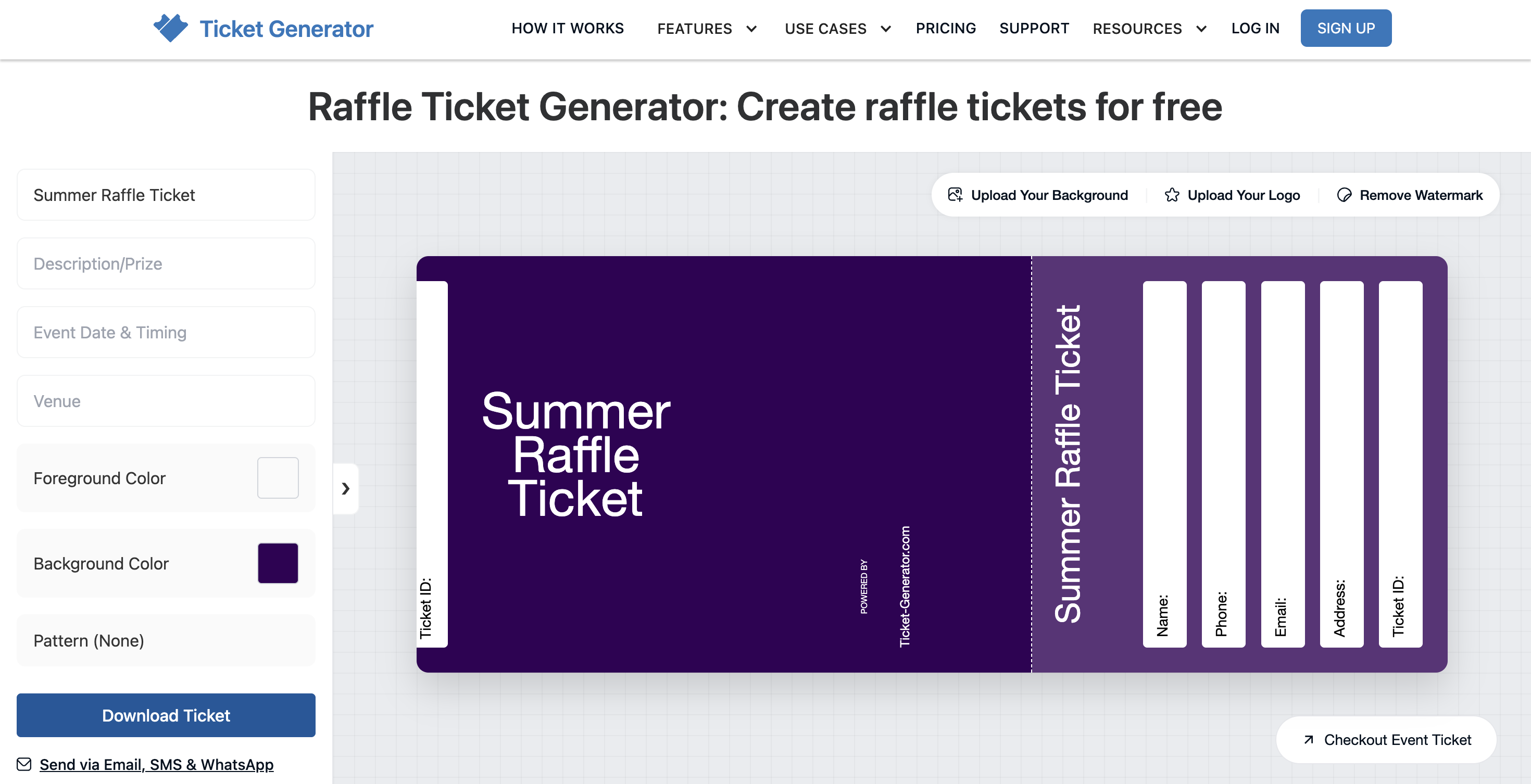
with no signup required. Simply paste each number into the Ticket ID field and download a print-ready PDF. For 50+ tickets or paid online raffles, the full
Ticket Generator
platform can bulk-generate personalized tickets directly from your Excel file in a single upload. Print on 200–250 gsm cardstock and use bundle pricing like 5 tickets for $20 to increase fundraising totals.
Are you planning a fundraiser, school event, or community gathering? Raffle tickets can be a game-changer for your event. Most volunteer organizers quickly realize that just any tickets won't do and you need ones with proper numbering to keep everything fair and organized.
Creating raffle tickets with numbers sounds tricky if you've never done it, but it's straightforward once you know the path.
For most fundraisers, the answer is a free online tool: pair it with Excel for your number sequence, design your ticket in the browser, and download a print-ready PDF. No signup, no event page, no software install.
I'll help you with the default flow first, and then I'll explain when it's worth stepping up to the full Ticket Generator platform (think: 100+ tickets bulk-generated from a spreadsheet, paid online sales, or QR validation at the venue).
Did You Know? The global lottery market reached $335 billion in 2023 and is expected to grow at a 5.2% annual rate through 2030. Growth is being driven by online lottery expansion, rising smartphone usage, and improved internet connectivity. Source:
Grand View Research.
Whether you're trying to raise money for a good cause, add some excitement to your next event, or drum up interest for your organization, well-designed raffle tickets make a huge difference. Your choice of raffle format and theme can significantly impact participation levels.
You'll learn how to create tickets that not only look professional but also help you avoid the annoying problems that can pop up on drawing day. By the time you finish reading, you'll have everything you need to make perfect printable raffle tickets for pretty much any event you can imagine.
Why does ticket numbering matter for a successful raffle?
When running a raffle, keeping things fair and organized is key. Numbered raffle tickets help you track how many tickets you've sold and make sure each ticket has a unique number.
Expert Insight: “If your raffle tickets aren’t clearly numbered, you’re inviting confusion. Simple sequential numbering keeps the draw fair, makes tracking easier, and reassures participants that everything is transparent.”
— Anshul Singh Bisht, Head of Event Technology, Ticket Generator
They also let you easily match winners to their prizes and prevent cheating or confusion during the drawing. Without proper numbering, your raffle could quickly become disorganized, leading to unhappy participants and potential problems.
What do you need to plan before making raffle tickets?
Before diving into making your tickets, take a moment to plan. Think about how many tickets you'll need for your event and what information should go on each ticket. Consider your numbering system, including your starting number and sequence.
You'll also want to think about colors and design elements that match your event theme or organization's branding. Good raffle ticket designs balance information with a clean structure.
You don't want them crowded with too much text, but they need all the essential details. Finding this balance makes your tickets both functional and attractive to potential buyers.
Every good raffle ticket should include these essential elements:
Event name and date
Ticket price
Prize information (optional)
Drawing date and location
Contact information
Unique ticket number
A matching stub (if using tear-off tickets)
Including all these details ensures your ticket buyers have all the information they need while helping you manage the raffle properly. Selecting compelling prizes that appeal to your target audience is another critical planning step.
What tools do you need to create numbered raffle tickets?
Making custom raffle tickets is easier with the right tools. You'll need a computer with internet access and Excel (or any spreadsheet) for creating your number sequence. For the ticket design itself, the simplest option is Ticket Generator's free raffle ticket maker (no signup required), ready-made raffle templates with a ticket-and-stub layout, and an editable Ticket ID field for your numbers.
If you're making physical tickets, you'll also need a printer and possibly a paper cutter for cutting printed sheets. Use quality paper stock to make your tickets look professional and prevent tearing or damage.
For larger quantities or if you want truly professional results, you can also take your design to a local print shop or use an online printing service. Many professional printers offer special features like perforation for tear-off stubs and higher-quality paper options that might be hard to achieve at home. Creative DIY solutions can work well for smaller community events with limited budgets.
How do you create raffle ticket numbers in Excel?
Before designing your tickets, set up your numbering system in Excel. This approach saves time and prevents numbering mistakes that could cause problems later.
Step 1: Set up your Excel spreadsheet
Start by opening a new Excel spreadsheet. Let's create a complete tracking system that will help you manage your raffle more effectively:
In cell A1, type "Participant Name"
In cell B1, type "Email Address"
In cell C1, type "Phone Number"
In cell D1, type "Ticket Number"
In cell E1, type "Ticket Price"
In cell A2, enter your starting number, which is usually 1 or 1001 if you want to start with a four-digit number. This will be the first number in your sequence. The other columns will remain empty at first, but you'll fill them in as you sell tickets.
This approach not only helps you create your ticket numbers but also gives you a ready-made system for tracking sales and contacting winners.
Step 2: Generate your sequence
Now that you have your first number, you need to create the rest of the sequence. Click on cell A2 where you entered your first number. Hover your mouse over the small square in the bottom right corner of the cell.
When your cursor turns into a plus sign, click and drag down to create as many numbers as you need. Excel will automatically create a sequence of consecutive numbers, saving you from entering each one manually.
Step 3: Add formatting (optional)
You might want your ticket numbers to look a certain way, like "001" instead of just "1" for a more professional appearance.
For Windows users:
Select your number column
Right-click and select "Format Cells"
Choose "Custom" category
Type "000" for three-digit numbers (or more zeros for longer numbers)
Click "OK"
For Mac users:
Select your number column
Click on "Format" in the top menu
Select "Cells..." from the dropdown
Click on the "Number" tab
Select "Custom" from the category list
Type "000" in the Format field (or more zeros for longer numbers)
Click "OK"
Now your ticket numbers will have leading zeros, giving them a consistent length and professional appearance no matter which version of Excel you're using.
Step 4: Add prefixes (optional)
For even more professional-looking tickets or to identify different raffle events, you might want numbers like "RAFFLE-001" instead of just numbers. To create this format:
Insert a new column B next to your numbers
In cell B2, type a formula like ="RAFFLE-"&TEXT(A2,"000")
Copy this formula down for all your tickets
This combines the text "RAFFLE-" with your formatted number, creating a consistent numbering system with a prefix.
Tip: Create a separate “notes” column in your Excel tracker to record special circumstances like group purchases or promotional giveaways.
Step 5: Save your work
Make sure to save your Excel file when you're finished. You'll need these numbers when designing your tickets, so save the file somewhere easy to find. Good organization now will save you time and frustration later in the process.
How do you design raffle tickets using an online platform?
Now that your numbering is ready in Excel, it's time to design your tickets. There are two paths depending on the size of your raffle:
→ Small batch (under ~50 tickets): Use the free raffle ticket maker and update the Ticket ID manually for each download. Best for school class raffles, small community draws, and any in-person event with a manageable ticket count.
→ Large batch (50+ tickets) or paid online sales: Use the full Ticket Generator platform. Upload your Excel sheet in one shot, and the platform generates a personalized, numbered ticket per row. Skip ahead to the next section for that flow.
Type your organization name, draw date, venue, prize description, and any permit text directly into the editor. Each field appears live on the ticket preview so you can see exactly what your finished design looks like.
Step 3: Customize the look
Add your logo, swap colors to match your branding, and tweak the font if needed. Make sure the Ticket ID field is large and easy to read. iIt's the most important element on the ticket at draw time.
Step 4: Add your first ticket number
From your Excel file, pick your first number (e.g., 001). Paste it into the Ticket ID field. The tool automatically prints the same number on both the ticket and the matching stub, so no mismatched halves.
Step 5: Download and repeat for each number
Download the print-ready PDF. Then change the Ticket ID to the next number (002, 003, …) and download again. Yes, this is manual, that's the trade-off for the free tool. For up to 50 or so tickets, it's still faster than running to a print shop. For more than 50, see Path B below.
Option 2: Full Ticketing platform (large batches, online sales, QR validation)
For 50+ tickets, paid online sales, or QR-based venue validation, the full platform handles things the free tool can't. The Excel work you already did in previous section pays off here. You can simply upload the file and the platform takes care of the rest.
Step 1: Upload your Excel file
In the platform dashboard, Create an event titled "Raffle" and once done, hit "New Tickets → Bulk Generate". Upload the Excel sheet you built in Section D. Map your columns (Name, Email, Ticket Number, etc.) to the ticket template's fields.
Step 2: Preview and confirm
The platform shows you the first few generated tickets so you can confirm the numbering, layout, and personalization look right before processing the full batch.
Step 3: Generate and download or generate and send
Choose "Generate and Download" to get a folder of PDFs you can print. Choose "Generate and Send" to email, SMS, or WhatsApp each ticket to the corresponding buyer with a unique QR Code attached.
Step 4: Validate at the venue (optional)
If your raffle is part of a venue event, use the Ticket Validator app (iOS, Android, or web) to scan QR Codes at the door. Each ticket can only be validated once — duplicates and screenshots are flagged.
Step 5: Watch sales in real time
The platform dashboard shows ticket sales, paid vs. unpaid, attendance rates, and unauthorized entry attempts as they happen. Export everything as Excel or PDF when the raffle wraps.
Pro Tip: Save your ticket design as a template for future events. Most platforms allow you to duplicate and modify past designs easily
Raffle ticket creation methods compared
Method
Cost
Numbering
Security
Distribution
Best For
DIY (Word/Paper)
Free
Manual only
None
Hand out
Under 50 tickets
Excel + Print Shop
$50-200
Excel sequence
None
Hand out
50-500 tickets
Canva Templates
Free
Manual placement
None
Download / email
Small events
Ticket Generator
$0.25-0.60 per ticket
Auto from Excel
QR codes built-in
Email / SMS / WhatsApp
Any size event
Ready to create your raffle tickets? Try Ticket Generator free. Just upload your Excel list and generate numbered tickets in minutes. No commission on ticket sales
Set Up Event Ticketing and Distribution in Minutes!
First 10 tickets free | Free account | No credit card required
What are the best design practices for raffle tickets?
Creating printable raffle tickets isn’t just about adding event details. Good design makes tickets easier to sell, easier to manage, and harder to duplicate.
1. Make tickets easy to read
Use clean, simple fonts.
Make the ticket number large and bold so it stands out instantly.
Keep spacing balanced. Don’t cram too much text onto a small ticket.
Put key details (event name, date, price) where they’re visible at a glance.
Clear tickets reduce check-in confusion and prevent number-reading mistakes during the draw.
2. Add basic security features
Even small raffles should protect against duplicates.
Add a QR code or barcode for quick scanning and validation.
Use colored or thicker paper to make photocopying obvious.
Include a light background pattern that won’t copy cleanly.
If you want stronger protection, use unique QR codes tied to each ticket number. This makes every ticket verifiable and prevents reuse.
Pro Tip: A subtle background pattern is a simple, low-cost way to discourage copying without increasing printing complexity. Design smart. It saves time at the draw and protects your credibility.
How do you print numbered raffle tickets at home?
Once your design is ready, printing quality matters. Use cardstock (65–110 lb) for durability and a professional feel. Pre-perforated paper makes tear-off stubs easier to separate.
For home printing, choose "high quality" print settings, select the correct paper size, and do a test print on regular paper first. Use a paper cutter (not scissors) for straight edges.
It's better to consider digital alternatives. Digital raffle tickets are becoming more common: email tickets with unique numbers, use QR codes for validation, create mobile-friendly formats, and reduce paper waste. Digital options simplify distribution while maintaining the important numbering system.
How should you manage and distribute your raffle tickets?
Having great tickets is just the start; you need a plan for selling and tracking them.
Tracking sold tickets: Create or choose a simple system to track which ticket numbers have been sold, who purchased each ticket, how many remain, and total sales. Update promptly after each sale to prevent confusion.
Distribution strategies: You can sell in person at events, distribute through volunteers, offer online sales with pickup options, or use mail delivery for distant supporters. Choose based on your audience and organizational capacity.
Using technology to your advantage: If you're running a small in-person draw, a spreadsheet and a volunteer with a pen is plenty. But for medium-to-large raffles with online sales, the Ticket Generator platform replaces three or four manual tools with one workflow:
A public event page where buyers can purchase tickets and pay via your own Stripe/PayPal/Razorpay (zero commission)
Instant ticket delivery by email, SMS, or WhatsApp the moment a buyer pays
A live dashboard showing sales, scan results, and unauthorized entry attempts as they happen
QR-Code validation at the door using any iOS or Android phone, multiple gates can scan in parallel, all synced
This setup is overkill for a 50-ticket church bake-sale raffle. It pays off for fundraisers selling 200+ tickets, multi-day events with check-ins, or any raffle where you want to skip paper entirely.
Pro Tip: You don't need to cobble together different tools; Ticket Generator handles design, distribution, and tracking in one place.
What pricing strategies maximize raffle fundraising?
Smart pricing can dramatically increase your raffle profits. The right price points make tickets accessible while maximizing fundraising potential.
Standard pricing options: Common pricing varies by event: $1–2 for small community raffles, $5–10 for medium-sized events, and $20+ for high-value prize raffles. Consider your audience's budget and the perceived value of prizes.
Bundle pricing: Create ticket bundles to encourage larger purchases: 1 ticket for $5, 3 for $10, 7 for $20, 15 for $40. As quantity increases, per-ticket price decreases. This approach often significantly increases total revenue.
Early bird specials: Offer discounted rates before a certain date, extra tickets for early buyers, or special prize entries for the first 100 purchases. These incentives drive sales when you need them most.
Pro Tip: Research similar events in your area to benchmark pricing. Being slightly below market rate often increases overall sales volume.
Successful raffle strategy templates that you can adapt
Community fundraiser strategy: A local school created bright, colorful raffle tickets numbered 1–1000 to raise playground funds. They priced tickets at $2 each or six for $10, added QR codes linking to prize photos, and raised over $4,000 with minimal costs.
Charity gala approach: A hospital foundation designed elegant custom tickets matching their black-tie theme, using a prefix system (GALA-0001 to GALA-5000). Higher pricing at $25 each or five for $100 reflected the exclusive nature of the event. Gold foil stamping added security and visual appeal.
Small business promotion: A shopping district gave free raffle tickets with any $25 purchase at participating stores, holding multiple weekly drawings to maintain interest throughout the holiday season. This increased foot traffic while building community goodwill.
How do you fix common raffle ticket problems?
Even with careful planning, you might hit snags. Here's how to handle the most common issues.
Numbering errors: If you discover duplicate numbers, immediately mark duplicates as void, create replacement tickets with new numbers, update your tracking system, and double-check remaining tickets.
Printing problems: Check printer alignment and settings, verify paper size selection, try a test print on regular paper first, and consider a professional print shop for large batches.
Design issues: If tickets are hard to read after printing, increase font size for important information.
Start creating your raffle tickets today
Making professional raffle tickets with numbers is straightforward with the right tools. Set up your numbering in Excel, design on a platform like Ticket Generator, and you'll have secure, branded tickets ready to sell in under 30 minutes.
Your tickets are often the first impression people have of your event; taking time to make them look good and work well is worth the effort.
Remember these key points:
Plan your numbering system carefully
Use Excel to create accurate number sequences
Keep your design clean and readable
Track sales diligently
Consider your audience when setting prices
For a small in-person raffle, the path is: build your number sequence in Excel → open the free raffle ticket maker → paste your numbers into the Ticket ID field as you download each ticket. No signup, no platform learning curve.
For 50+ tickets, paid online sales, or QR-based venue validation, going for Ticket Generator pays off: upload your Excel file once, the platform generates a personalized numbered ticket per row, sends them by email/SMS/WhatsApp, and gives you a live dashboard from sale to scan. Use the tool that matches your raffle's scale, not one that forces you to overinvest.
Now you're ready to create the perfect raffle tickets for your next event! Good luck with your fundraiser or community raffle, and may your event be a great success that exceeds your fundraising goals.
FAQs
Q. How many raffle tickets should I print?
A. For small community events, 500-1000 tickets is often enough. Larger fundraisers might need several thousand. It's better to print slightly more than you think you'll need rather than running out during sales.
Q. Do raffle tickets need to be numbered consecutively?
A. Consecutive numbers make tracking easier and reduce confusion. You could use different ranges for different sellers (1-500, 501-1000, etc.) to track performance. Just ensure each ticket has a unique number.
Q. Can I legally run a raffle?
A. Rules vary by location. Non-profits can usually hold raffles more easily but often need permits. Some areas require license applications and have specific rules about prizes and sales. Check your local laws before planning your event.
Q. How do I prevent ticket fraud?
A. Use quality paper that's difficult to photocopy. Add security features like watermarks or unique patterns. Keep records of which numbers are sold. Validate tickets at the drawing against your sales records.
Jayanshu writes for one reason: to help you create better events. He breaks down the complex world of event management—from ticketing and marketing to attendee engagement—into simple, step-by-step guides. Forget the theory; his articles are all about practical advice you can put into action immediately to make your next event a success.






.png)





.webp)

.svg)
.svg)
